

Recommendation
Start Accelerate opens Acknowledge the disclaimer. You can close it. Staff cannot accept it for you.
The notice says the configuration information is a simulation from current network data, for information only. Optimum does not guarantee a performance outcome. Changes you make on your own infrastructure are your decision, and Optimum is not liable for the outcomes of using that information.
Read the text in the dialog. The copy on this page is a summary so you know what the step is. The dialog is the agreement.
After you accept, Your MEV-Boost setup asks you to upload the config you run, with Upload config or by dropping the file on the box. Your cutoff, your late_in_slot_time_ms, and your relay set are read from it, so the recommendation is against what you actually run. Console compares it with what your proposals show. It still does not change anything on your side.
The upload reads MEV-Boost YAML. If you run Commit-Boost, upload a MEV-Boost YAML with the same timeout_get_header_ms, late_in_slot_time_ms, and relay URLs. The Adjust step exports either format. See MEV sidecar configuration.
A file Console cannot read is refused with That was not accepted and the reason, named at the line.
If the configuration is already on file and the terms are not yet acknowledged, the screen says One thing before your recommendation. Read and acknowledge opens the same dialog. The recommendation stays hidden until you accept.
Until a file is on record, the report has no cutoff to judge proposals by, and step 2 shows the upload.
The recommendation itself is withheld below 200 measured proposals. The callout is Not enough proposals yet for a recommendation. See Readiness.
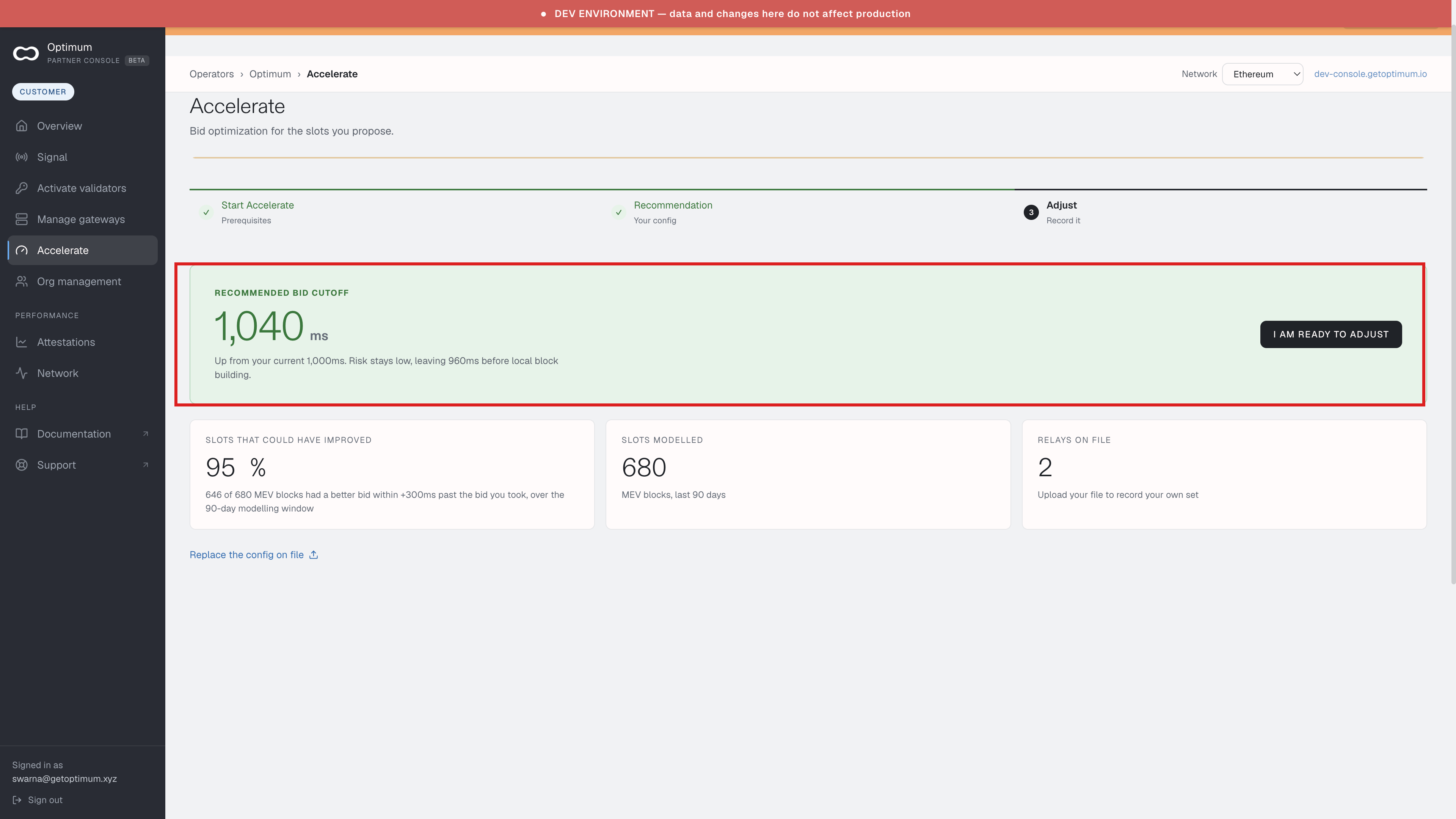
Once the window can support a number, the panel is Recommended bid cutoff, in milliseconds, with I am ready to adjust. The line under the number is the move from your current cutoff, and how much time that leaves before local block building. Replace the config on file uploads a different file.
Beside it:
- Slots that could have improved — the share of MEV blocks that had a better bid within a stated offset past the bid you took, over the modelling window.
- Slots modelled — MEV blocks in that window.
- Relays on file — how many relays the uploaded config names. Upload your own file if you want this to be your set.
The figure is uplift that was available at that offset, on blocks already proposed. It does not price the risk of waiting. No cutoff change indicated means the window does not support moving it.
When a cycle completes, the top of the screen says Your measurement cycle is complete and how many proposals were measured since your last change. Review the recommendation opens this step. Dismissing hides the notice until the next cycle. Accelerate in the sidebar shows 1 until you answer.